
Finding Your Typing Nirvana
As a writer, your keyboard isn’t just an input device; it’s an extension of your thoughts, a conduit for your creativity, and a vital tool in your craft. The right keyboard can transform the arduous task of typing into a seamless, almost meditative experience, while the wrong one can lead to frustration, fatigue, and even injury. You spend countless hours with your fingers dancing across these keys, so investing in a keyboard that truly suits your needs is not a luxury, but a necessity. This guide will walk you through the essential considerations and top recommendations to help you discover the perfect keyboard that will empower your writing journey.
Understanding Your Writing Style and Needs
Before you even begin to browse specific models, take a moment to reflect on your personal writing habits and preferences. Are you a fast, aggressive typist, or do you prefer a softer, more deliberate touch? Do you write for long, uninterrupted stretches, or do you take frequent breaks? Do you need a portable solution for writing on the go, or is your workstation a fixed sanctuary? Your answers to these questions will significantly narrow down the vast array of options available.
Ergonomics for Endurance
One of the most critical aspects for any writer is ergonomics. You’ll be spending hours, days, and even years with your hands positioned over a keyboard, and poor ergonomics can lead to discomfort, strain, and serious conditions like carpal tunnel syndrome. Prioritizing your physical well-being is paramount for a sustainable writing career.
Split Keyboards and Tent Designs
If you experience wrist pain or find traditional keyboard layouts awkward, a split keyboard might be your savior. These keyboards divide the keys into two sections, often with an adjustable angle, allowing your hands and wrists to rest in a more natural, neutral position. Some even feature a “tent” design, raising the center of the keyboard to further reduce pronation (the inward rotation of your forearms). While there’s a slight learning curve, the long-term benefits for your joint health can be immense. Brands like Kinesis and ErgoDox are pioneers in this space, offering highly customizable and ergonomic solutions.
Keycap Profiles and Materials
The shape and material of your keycaps also play a role in comfort. Sculpted keycaps, which have varying heights and angles across rows, can provide a more natural feel for your fingertips. Materials like PBT plastic are often preferred over ABS for their durability and resistance to shine over time, which can become distracting. Some writers even opt for textured keycaps to provide a better grip and tactile feedback.
Wrist Rests and Posture
Regardless of your keyboard choice, a good wrist rest is highly recommended. It helps maintain a neutral wrist position, preventing your wrists from bending upwards or downwards. Ensure your chair height and desk setup allow for your forearms to be roughly parallel to the floor, and your elbows at a 90-degree angle. This foundational ergonomic setup complements any keyboard choice you make.
For writers looking to enhance their productivity and comfort, exploring the best keyboards is essential. A related article that delves into the experience of conquering challenges, much like finding the perfect writing tools, is available at this link: Conquering Nephin: A Walk to the Summit. This piece not only highlights the importance of perseverance but also serves as a reminder that the right tools can make all the difference in achieving your goals.
The Mechanical Keyboard Advantage
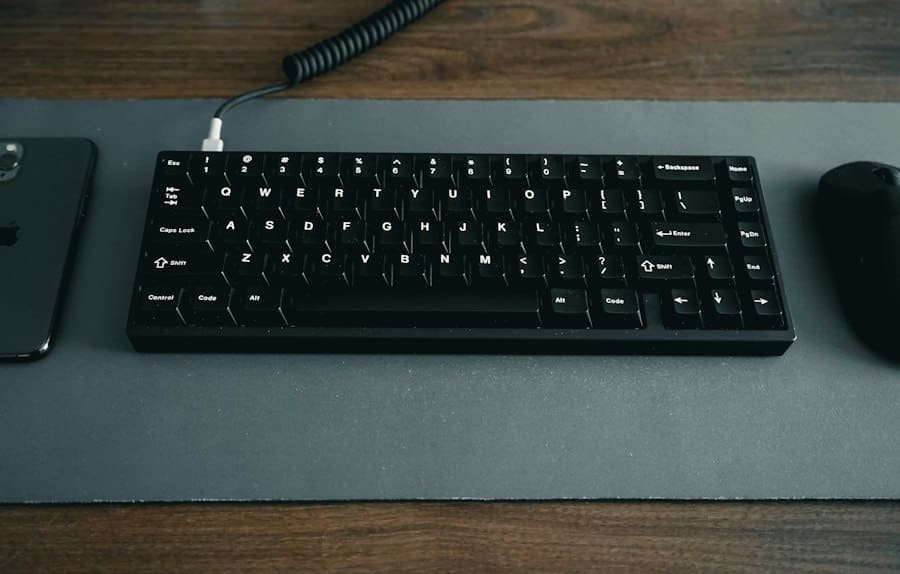
For many writers, a mechanical keyboard is the gold standard. Unlike membrane keyboards, which use a single rubber sheet to actuate keys, mechanical keyboards employ individual switches under each key. This design offers a superior typing experience characterized by tactile feedback, audible clicks (or silent presses, depending on the switch), and exceptional durability.
Understanding Mechanical Switches
The “feel” of a mechanical keyboard is largely determined by its switches. There are three main categories: linear, tactile, and clicky. Each offers a distinct typing experience, and your preference will be highly personal.
Linear Switches (Smooth and Consistent)
Linear switches, like the popular Cherry MX Red or Gateron Red, offer a smooth, consistent keystroke from top to bottom. There’s no bump or click to indicate actuation; you simply press the key down fully. These are often favored by gamers for their fast response times, but many writers appreciate their quiet operation and effortless press, especially for long typing sessions where minimal resistance is desired. If you’re a light typist or prefer a fluid motion, linear switches might be for you.
Tactile Switches (Responsive Feedback)
Tactile switches, such as Cherry MX Brown or Gateron Brown, provide a noticeable “bump” partway through the keystroke. This bump gives you feedback that the key has registered, without the accompanying click of a clicky switch. Many writers find this tactile feedback incredibly helpful, as it allows them to type without “bottoming out” (pressing the key all the way down), which can reduce finger fatigue. If you value knowing when your key press has actuated without the noise, tactile switches are an excellent choice.
Clicky Switches (Audible Confirmation)
Clicky switches, like Cherry MX Blue or Gateron Blue, combine the tactile bump with an audible “click” sound at the actuation point. This provides both physical and auditory feedback for every key press. While some find the sound satisfying and encouraging, others find it too noisy, especially in shared workspaces. If you enjoy the definitive confirmation of each keystroke and aren’t concerned about noise levels, clicky switches can be incredibly rewarding.
Key Features to Look For
Beyond the switches, several other features contribute to the overall quality and suitability of a mechanical keyboard for writers.
Build Quality and Materials
A sturdy build is crucial for longevity and a premium typing feel. Look for keyboards with aluminum or steel plates, which add weight and rigidity, preventing flex during typing. PBT keycaps are generally preferred for their durability and resistance to oil and shine, maintaining their texture and appearance over time.
Backlighting
For writers who often work in dimly lit environments or late into the night, backlighting is a valuable feature. Customizable RGB backlighting can be fun, but for practical writing, a simple white backlight with adjustable brightness levels is often sufficient. Ensure the legends on the keycaps are shine-through for optimal visibility.
Programmable Keys and Macros
While perhaps not essential for every writer, programmable keys and macro support can be a productivity booster. You can assign complex key sequences, frequently used phrases, or even specific software functions to a single key, saving you time and effort. Many mechanical keyboards come with software that allows for easy customization of key assignments and macros.
The Versatility of Wireless and Compact Keyboards

While wired mechanical keyboards offer peak performance and reliability, advancements in wireless technology have made wireless keyboards a viable and attractive option for many writers, especially those who value a clutter-free workspace or need portability.
The Freedom of Wireless
A wireless keyboard can significantly tidy up your desk, eliminating unsightly cables. Bluetooth connectivity is the most common and convenient option, offering compatibility with a wide range of devices including laptops, tablets, and even smartphones. Look for keyboards with reliable Bluetooth 5.0 or higher for stable connections and minimal latency. Some wireless keyboards also offer 2.4GHz wireless connectivity via a USB dongle, which can provide an even more stable and lower-latency connection, though it requires a free USB port.
Battery Life Considerations
If you opt for a wireless keyboard, battery life is a crucial factor. Keyboards with rechargeable batteries are generally preferred over those that require disposable ones, both for environmental reasons and convenience. Look for models that offer weeks or even months of battery life on a single charge, and ideally, those that can be used while charging.
Compact Layouts for Portability and Desk Space
For writers who are frequently on the go or have limited desk space, compact keyboard layouts offer significant advantages.
Tenkeyless (TKL) Keyboards
A tenkeyless (TKL) keyboard removes the numeric keypad, resulting in a more compact footprint. This not only saves desk space but also allows your mouse to be positioned closer to your body, promoting a more ergonomic posture. For most writers, the numeric keypad is rarely used, making the TKL layout an excellent balance between functionality and compactness.
60% and 65% Keyboards
Even smaller are 60% and 65% keyboards. A 60% keyboard omits the numeric keypad, function row, navigation cluster (arrow keys, home, end, etc.), and often the dedicated delete key. These functions are typically accessed via a “Fn” layer, requiring key combinations. A 65% keyboard adds back the arrow keys and a few navigation keys, making it slightly more functional while still being very compact. While these layouts require some adaptation, they are incredibly portable and offer a minimalist aesthetic that many writers appreciate. If you prioritize portability above all else and are comfortable with memorizing key combinations, these ultra-compact options can be very rewarding.
Software and Customization: Beyond the Keys
A truly great keyboard integrates seamlessly with your workflow, and modern keyboards often come with powerful software that allows for extensive customization. This can significantly enhance your productivity and personalize your typing experience.
Key Remapping and Macro Creation
Most quality keyboards, especially mechanical ones, offer software that allows you to remap keys and create macros. This means you can assign any key to perform a different function, or even trigger a sequence of actions with a single press. Imagine assigning a macro to paste frequently used boilerplate text, or to open your writing application with a specific document. This can be a huge time-saver for repetitive tasks.
Profile Management
For writers who use different software or switch between various writing projects, profile management is invaluable. You can create different keyboard profiles, each with its own key mappings, macros, and even backlighting settings. For example, you might have a profile optimized for Scrivener, another for Microsoft Word, and a third for coding. Switching between profiles is usually a quick button press or a software command, allowing your keyboard to adapt instantly to your current task.
Backlighting Customization
While aesthetic for some, backlighting customization can also be functional. You can set different zones of your keyboard to light up based on function, or create dynamic lighting effects that subtly indicate certain states. Some software even allows for “reactive” lighting, where keys light up when pressed, providing an additional layer of feedback. For writers who work in low-light conditions, having precise control over brightness and patterns can reduce eye strain.
For writers seeking the perfect keyboard to enhance their productivity, it’s also important to consider the broader context of their work environment. A recent article discusses the advantages and disadvantages of remote work, which can significantly impact a writer’s workflow and creativity. You can read more about this topic in the article on remote work benefits and drawbacks for 2024 here. Understanding how your workspace influences your writing can help you make more informed choices about the tools you use.
Top Keyboard Recommendations for Writers
Now that you understand the key considerations, let’s explore some specific keyboards that consistently rank high among writers. These recommendations span different price points, switch types, and form factors, ensuring there’s something for every preference.
The All-Rounder: Keychron K Series (K2, K8, K12)
Keychron has carved out a significant niche by offering high-quality, feature-rich mechanical keyboards at accessible price points. Their K series is particularly popular among writers due to its versatility. You’ll find options for TKL (K8), 75% (K2), and 60% (K12) layouts, all featuring hot-swappable switches (meaning you can change switches without soldering) and both wired and wireless (Bluetooth) connectivity. They offer a range of Gateron switches (Red, Brown, Blue) to suit your preference, and most come with Mac and Windows keycap layouts. The aluminum frame options provide excellent build quality, making them a fantastic value proposition for writers seeking a reliable and customizable experience.
Hot-Swappable Switches for Experimentation
The hot-swappable feature of Keychron boards is a major draw. It allows you to try different switch types without committing to a single one. This is perfect for writers who are new to mechanical keyboards and want to experiment with linear, tactile, and clicky switches to find their ideal typing feel. You can even mix and match switches on different keys if you have specific preferences for certain functions.
The Ergonomic Champion: Kinesis Advantage360
For writers who prioritize ergonomics above all else, the Kinesis Advantage360 is an investment that can significantly improve comfort and potentially prolong your writing career. This fully split, contoured keyboard is designed to minimize pronation, wrist extension, and ulnar deviation. It features concave keywells that allow your fingers to reach all keys with minimal movement, and programmable firmware for extensive customization. While it comes with a steep learning curve due to its radical design, the long-term benefits for those suffering from repetitive strain injuries or simply seeking peak comfort are unparalleled. It comes in both wired and wireless Bluetooth versions, allowing for flexible desk setups.
Mastering the Contoured Layout
The unique layout of the Advantage360 takes time to master. The concave keywells and thumb clusters are a departure from traditional keyboards. However, once you adapt, you’ll find that your hands remain in a much more natural and relaxed position, leading to less fatigue and a more comfortable typing experience over extended periods. The programmable layers mean you can customize the layout to your exact specifications, placing frequently used keys exactly where you need them.
The Portable Powerhouse: Logitech MX Keys Mini
If you’re a writer who travels frequently or demands a minimalist, highly functional wireless keyboard for a clean desk setup, the Logitech MX Keys Mini is an outstanding choice. While not mechanical, its “Perfect Stroke” scissor switches offer a remarkably satisfying and quiet typing experience. The scooped keycaps are comfortable, and the smart backlighting (which adjusts to ambient light and turns on as your hands approach) is a premium touch. It connects wirelessly via Bluetooth and can seamlessly switch between up to three devices, making it incredibly versatile for writers who use multiple gadgets. Its compact 60% layout is sleek and ideal for portability.
Seamless Multi-Device Connectivity
The MX Keys Mini’s ability to effortlessly switch between devices (e.g., your laptop, tablet, and phone) is a huge convenience for writers who jump between platforms. The dedicated “Easy-Switch” buttons make this a breeze, saving you time and hassle. The consistent typing experience across devices also helps maintain your flow.
The Premium Performer: HHKB Professional Hybrid Type-S
For the discerning writer who values a refined, high-end typing experience and isn’t afraid to invest, the Happy Hacking Keyboard (HHKB) Professional Hybrid Type-S is an icon. It features Topre switches, which are a hybrid electrostatic capacitive switch known for their unique “thock” sound and incredibly smooth, satisfying feel – often described as typing on clouds. Its compact 60% layout is designed for efficiency, with a minimalist aesthetic and a focus on programmer-centric key placements (though easily adaptable for writers). The Type-S variant includes silenced switches for a quieter experience. While expensive, it offers an unparalleled typing feel and exceptional durability, making it a lifetime keyboard for many.
The Unique Topre Typing Experience
Topre switches are unlike any other. They offer a distinctive blend of tactility and smoothness, with a satisfying bottom-out feel that is neither harsh nor mushy. The sound, often referred to as a “thock,” is deep and muted, providing excellent auditory feedback without being disruptive. Many writers find this unique feel to be exceptionally conducive to long, focused typing sessions, reducing fatigue and enhancing enjoyment.
The Budget-Friendly Mechanical: Tecware Phantom TKL
For writers looking to dip their toes into the mechanical keyboard world without breaking the bank, the Tecware Phantom TKL is an excellent entry-level option. It offers a solid TKL layout, available with Outemu mechanical switches (often Red, Brown, or Blue equivalents) that provide a respectable typing experience for the price. It features RGB backlighting, braided cables, and a surprisingly sturdy build quality for its cost. While it may not have all the premium features of more expensive boards, it delivers a very capable and enjoyable mechanical typing experience, making it a great starting point for aspiring mechanical keyboard enthusiasts.
Customizable Backlighting on a Budget
Despite its affordable price, the Tecware Phantom TKL often includes robust RGB backlighting options. This means you can customize the lighting effects and colors to suit your mood or workspace, adding a touch of personalization without a significant financial outlay. While primarily aesthetic, it can enhance the overall experience and make your desk feel more inviting for creative work.
P.S. Enjoyed this? Become an insider and I'll send you one of my favourite posts every couple of weeks.