SEO for beginners in plain English: keywords, page titles, speed, links and Search Console, so your website finally shows up on Google.
My Journey into SEO: Understanding the Fundamentals
As a budding website owner, the phrase "get your website on Google" felt both exhilarating and incredibly daunting. I knew Google was the gatekeeper to online visibility, but the path to earning its favor seemed shrouded in mystery. This is my personal account of deciphering the basics of Search Engine Optimization (SEO) and the steps I took to start my website's journey towards Google's coveted first page. It's a journey filled with learning, experimentation, and a healthy dose of trial and error.
My initial understanding of SEO was rudimentary at best. I thought if I just had a website, Google would magically find it. Oh, how wrong I was! I quickly learned that Google, and other search engines, use complex algorithms to crawl, index, and rank billions of web pages. Their ultimate goal is to provide users with the most relevant and highest-quality results for their queries. This realization was my first critical step: SEO isn't about tricking Google; it's about making my website genuinely valuable and easily discoverable for both users and search engines.
What Exactly is SEO?
When I first delved into SEO, I encountered countless definitions. For me, the most concise and helpful one became this: SEO is the practice of optimizing your website to improve its visibility on search engine results pages (SERPs). This isn't just about showing up; it's about showing up high enough to be seen and clicked. It encompasses a wide range of techniques, from technical tweaks to content creation and link building. It's a holistic approach to making my website a better resource for its target audience and, consequently, more appealing to search engines.
I also learned that SEO is not a one-time task. It's an ongoing process. Search engine algorithms constantly evolve, user behavior shifts, and competitors emerge. This means I have to continuously monitor my website's performance, adapt my strategies, and stay updated with the latest SEO trends. It's a marathon, not a sprint, and I've come to embrace the continuous learning involved.
Why Google Dominates My Focus
While there are many search engines out there, my primary focus has always been Google. And for good reason. Google commands an overwhelming majority of the global search market share. If I want my website to be found by the widest possible audience, then optimizing for Google is non-negotiable. What I've also found is that many of the best practices for Google SEO translate well to other search engines like Bing and DuckDuckGo, though they might have their own nuanced algorithms. So, by prioritizing Google, I'm effectively laying a strong foundation for broader search engine visibility.
My initial goal was simple: get my website to appear on Google. The dream, of course, was to reach the first page, ideally in one of the top three positions. I understood that this would drive organic traffic, meaning visitors who find my website through unpaid search results, which is incredibly valuable. This organic traffic is often highly qualified because users are actively searching for information related to what my website offers. It's this promise of engaged visitors that fueled my early SEO efforts.
For those looking to enhance their understanding of digital marketing in conjunction with SEO, you might find the article on remote work particularly insightful. It explores the benefits and drawbacks of remote work in 2024, which can be crucial for businesses aiming to optimize their online presence. You can read more about it here: Remote Work: Exploring Benefits & Drawbacks in 2024. This knowledge can complement your SEO strategies by highlighting how remote work trends can influence your target audience and online engagement.
Laying the Groundwork: Technical SEO Essentials

Before I even thought about writing content or building links, I realized I needed to ensure my website's technical foundation was solid. Imagine building a beautiful house on a crumbling foundation; it simply won't last. Technical SEO involves optimizing the underlying structure and functionality of my website to make it easier for search engine crawlers to access, understand, and index my content. This was where I spent a significant amount of time in the beginning, meticulously checking and double-checking various aspects.
My experience taught me that ignoring technical SEO is a common pitfall for beginners. It's not as "glamorous" as content creation, but it's absolutely crucial. Without proper technical optimization, even the most brilliant content might remain hidden from search engines.
Ensuring Crawlability and Indexability
The first hurdle I needed to overcome was making sure Google's "spiders" or "crawlers" could actually find and read my website. If they can't crawl it, they can't index it, and if it's not indexed, it won't appear in search results. I focused on a few key areas here.
First, I created and submitted a sitemap.xml file to Google Search Console. This file acts like a map of my website, telling search engines about all the important pages I want them to crawl and index. It's a straightforward but powerful tool.
Second, I learned about robots.txt. This file tells search engines which parts of my site they can and cannot crawl. I was careful to ensure that I wasn't accidentally blocking important pages. A common mistake I saw others make was inadvertently blocking their entire site from crawling. I double-checked my robots.txt file regularly using Google Search Console's robots.txt Tester tool.
Finally, I paid close attention to canonicalization. If I had multiple URLs for the same content (e.g., www.example.com/page and example.com/page), Google might get confused. I used canonical tags (<link rel="canonical" href="[preferred-URL]" />) to tell Google which version of the page was the primary one, preventing duplicate content issues and consolidating link equity.
Optimizing Website Speed and Mobile-Friendliness
In today's fast-paced digital world, users expect websites to load almost instantly. Google knows this, and page speed is a significant ranking factor. I used tools like Google PageSpeed Insights to identify bottlenecks and implement improvements. This involved things like optimizing images (compressing them without sacrificing quality), leveraging browser caching, and minimizing CSS and JavaScript files. The goal was to get my website loading as quickly as possible. Every second counts.
Equally important, and now arguably more so, is mobile-friendliness. A vast majority of internet users access websites from their smartphones. Google has adopted a mobile-first indexing approach, meaning it primarily uses the mobile version of my website for indexing and ranking. I ensured my website was responsive, meaning it adapted seamlessly to different screen sizes. I regularly tested my site's mobile usability using Google's Mobile-Friendly Test tool, ensuring all elements were easily viewable and interactive on smaller screens. This wasn't just for SEO; it was about providing a good user experience, which ultimately benefits my search rankings.
+ Join Our Writing Community for FREE
Chain Story Online
Fun, free, flash fiction writing with writers just like you. You have ~100 words to begin a story or continue a story and make it yours.
Story Bible Studio
Digital space for writers to plot, plan, and build better stories. Designed by writers for writers. Your final draft awaits.
Structuring My Website for Search Engines
A well-structured website is not only easier for users to navigate but also for search engines to understand. I adopted a logical hierarchy for my content, moving from broad categories to more specific subcategories and individual pages. This structure is often visualized as a pyramid, with the homepage at the top.
I also made conscious efforts to use clear and descriptive URLs. Instead of cryptic strings of numbers and letters, I created URLs that reflected the content of the page, incorporating relevant keywords where appropriate. For example, www.example.com/blog/seo-for-beginners is much better than www.example.com/pageid=123.
Finally, I focused on good internal linking. This means linking relevant pages within my own website. Internal links help search engines discover new pages, distribute "link juice" (ranking power) across my site, and guide users to related content. I made sure my internal links used descriptive anchor text (the visible, clickable text of a hyperlink) rather than generic phrases like "click here."
Mastering Keyword Research and Content Creation
Once the technical foundation was set, my attention shifted to the heart of SEO: content. But not just any content. I needed content that my target audience was actively searching for, and that meant diving deep into keyword research. This phase was exciting because it directly connected with understanding my potential users and what problems or questions they had.
My philosophy became: create valuable content that genuinely helps people, and then optimize it so Google can find it. The two go hand in hand.
Unearthing Relevant Keywords
Keyword research became my superpower. It wasn't about blindly stuffing keywords into my content, but about understanding the language my audience used. I started by brainstorming broad topics related to my website's niche. Then, I used a combination of free and paid tools to expand my list.
Google Keyword Planner was my first stop. It allowed me to see search volumes for keywords, related terms, and even competition levels. I also explored Google's "People Also Ask" section and "Searches related to" suggestions on the SERP for new ideas. These gave me insights into questions users were asking and related topics they were exploring.
I focused on a mix of short-tail keywords (broad terms like "SEO tips") and long-tail keywords (more specific phrases like "how to get my small business website on Google"). Long-tail keywords, while having lower search volume, often indicate higher search intent and face less competition, making them easier to rank for as a beginner. My goal was to find keywords with a decent search volume and manageable competition.
Crafting Engaging and Optimized Content
With my keywords in hand, I moved on to creating content. My guiding principle was quality over quantity. I aimed to create comprehensive, well-researched, and engaging content that genuinely answered user queries or provided valuable information.
I integrated my target keywords naturally throughout my content, especially in the title, headings (H2, H3), introductory paragraphs, and conclusion. However, I rigorously avoided keyword stuffing, which Google penalizes. My focus was on readability and providing value.
I also paid attention to the length and depth of my content. For competitive keywords, longer, more in-depth articles often perform better because they tend to cover a topic more comprehensively. I included multimedia elements like images and videos to break up text, improve engagement, and convey information more effectively.
Structuring Content for Readability and SEO
Beyond just the words, how I presented my content was crucial. I used clear and descriptive headings and subheadings (like the ones you're reading now) to break up my content into digestible chunks. This not only improved readability for my human audience but also helped search engines understand the structure and main topics of my page.
I also employed bullet points and numbered lists to present information clearly and concisely. This is particularly useful for instructional content or summarizing key takeaways. Paragraphs were kept relatively short to avoid large blocks of text that can be intimidating to readers.
Finally, I made sure to optimize my meta title and meta description for each page. The meta title is what appears as the clickable headline in search results, and the meta description is the short summary beneath it. These are crucial for attracting clicks. I included my primary keyword in both and crafted compelling descriptions that encouraged users to click through to my website.
Building Authority: Link Building and Off-Page SEO
Once I had a technically sound website with great content, the next challenge was convincing Google that my website was an authoritative and trustworthy source. This is where link building and other off-page SEO strategies came into play. I realized that links from other reputable websites acted like votes of confidence, telling Google that my content was valuable.
This part of SEO felt a bit more like networking and relationship building than pure technical work, but it was equally important for climbing the search rankings.
Understanding the Power of Backlinks
Backlinks, also known as inbound links, are links from other websites pointing to mine. For Google, these are a strong indicator of a page's authority and relevance. The more high-quality, relevant backlinks I acquired, the more authoritative my website appeared to search engines. However, I quickly learned that not all backlinks are created equal.
I focused on acquiring links from reputable websites within my niche. A link from a well-known industry blog or a university website carried far more weight than a link from a spammy, irrelevant site. I also paid attention to the anchor text used in the backlinks. If the anchor text accurately reflected the content of my page, it provided an additional signal to Google about what my page was about.
I strictly avoided "black hat" link-building tactics, such as buying links or participating in link schemes, as these can lead to severe penalties from Google. My approach was always about earning links naturally through valuable content and genuine outreach.
Strategies for Earning Quality Backlinks
My link-building efforts started with creating truly linkable assets. This meant producing content that was so good, so insightful, or so useful that other websites would naturally want to link to it. Examples included comprehensive guides, original research, compelling infographics, or useful tools.
Then, I engaged in outreach. I identified websites and blogs in my niche that might find my content valuable and reached out to them, gently suggesting my article as a resource they might consider linking to. This required a personalized approach; generic emails were often ignored. I focused on showing them why my content would be a good fit for their audience.
I also explored guest blogging. By writing high-quality articles for other websites in my industry and including a link back to my site in my author bio or within the content (where appropriate), I could gain valuable exposure and backlinks. This also helped establish me as an authority in my field.
Finally, I kept an eye on broken link building. I would find broken links on other websites and suggest my relevant content as a replacement. This is a win-win: the other website fixes a broken link, and I get a backlink.
Leveraging Social Media and Local SEO
While social media signals aren't direct ranking factors in the same way backlinks are, they play an indirect role in SEO. Sharing my content on platforms like Twitter, Facebook, and LinkedIn increased its visibility, drove traffic to my website, and potentially led to natural backlinks. More eyes on my content meant more opportunities for it to be discovered and linked to.
For my local business, Local SEO was incredibly important. This involved optimizing my online presence to attract customers from specific geographic areas. The cornerstone of my local SEO strategy was setting up and optimizing my Google Business Profile. I ensured all information was accurate and complete, including my business name, address, phone number, website, hours of operation, and photos. I also encouraged customers to leave reviews, as positive reviews are a significant local ranking factor.
I also optimized my website for local keywords (e.g., "best coffee shop in Anytown") and ensured my name, address, and phone number (NAP) were consistent across all online directories. These small steps made a big difference in getting found by local customers searching on Google Maps and local search results.
For those looking to enhance their understanding of search engine optimization, a great resource is the article on effective keyword research strategies. This piece complements "SEO for Beginners: How to Get Your Website on Google" by providing deeper insights into how to identify the right keywords that can drive traffic to your site. You can check it out for more detailed guidance on optimizing your content effectively by visiting this link.
If you're looking for a collaborative writing platform, check out Chain Story Online. It's a great way to connect with other writers and create stories together. Many users have found inspiration and creativity through Chain Story Online.
Monitoring and Adapting: The Ongoing SEO Process
My journey with SEO quickly taught me that it's not a set-it-and-forget-it endeavor. The digital landscape is constantly changing, and what works today might not work tomorrow. Therefore, continuous monitoring, analysis, and adaptation became integral parts of my SEO strategy. This ongoing process is what truly distinguishes successful SEO from one-off attempts.
I dedicated time each week to review my performance, identify areas for improvement, and stay informed about the latest SEO trends. It's a commitment, but one that has consistently yielded positive results.
Utilizing Google Search Console
Google Search Console (GSC) became my best friend. It's a free web service by Google that helps me monitor my website's performance in Google Search. Through GSC, I could:
- Monitor indexing status: I could see which pages Google had indexed and identify any crawling errors. This was crucial for ensuring all my important content was discoverable.
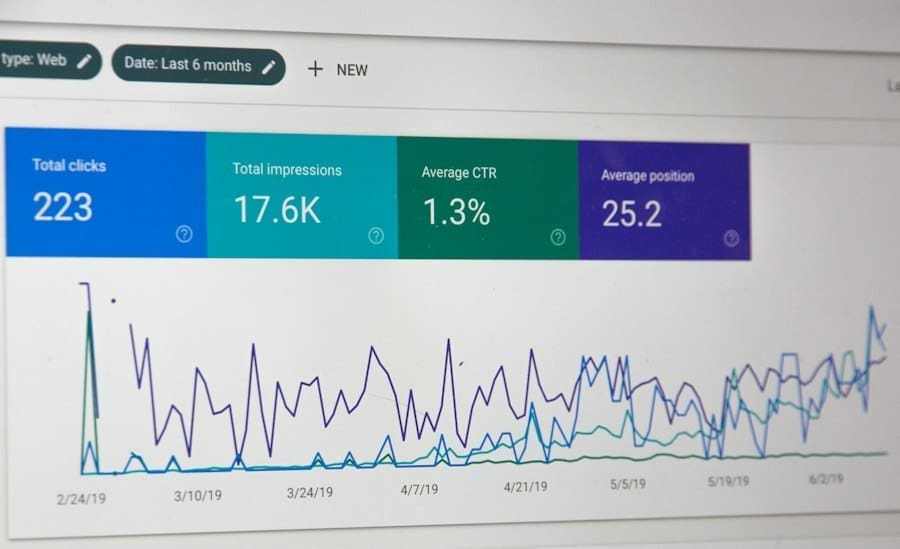
- Track search queries: GSC showed me the keywords people were using to find my website, my average position in search results for those keywords, and my click-through rate (CTR). This data was invaluable for refining my keyword strategy.
- Identify mobile usability issues: GSC alerted me to any problems visitors might experience on mobile devices.
- Check for security issues: It informed me of any malware or hacking attempts on my site.
- Submit sitemaps: As mentioned before, I used GSC to submit and monitor my sitemap.
Regularly checking GSC allowed me to quickly diagnose and fix issues, capitalize on new opportunities, and understand how Google was perceiving my website.
Leveraging Google Analytics for User Behavior Insights
While GSC focuses on how Google sees my website, Google Analytics (GA) gave me insights into how users interact with my site once they land there. This was crucial for understanding user behavior and identifying potential areas for improvement in my content and user experience.
Through GA, I could track:
- Traffic sources: Where my visitors were coming from (organic search, social media, direct, etc.).
- Bounce rate: The percentage of visitors who leave my site after viewing only one page. A high bounce rate could indicate that my content wasn't relevant or engaging enough.
- Time on page: How long visitors spent on specific pages, which helped me gauge content engagement.
- Conversion rates: If I had specific goals (e.g., newsletter sign-ups, purchases), GA helped me track how well my website was converting visitors.
By analyzing this data, I could make informed decisions about content improvements, website design adjustments, and even identify new content topics based on what visitors were engaging with most.
Staying Updated with SEO Trends and Algorithm Changes
The world of SEO is constantly evolving. Google frequently updates its algorithms, sometimes with major shifts that can significantly impact rankings. To avoid being left behind, I made it a priority to stay updated.
I subscribed to prominent SEO blogs (like Moz, Search Engine Journal, Ahrefs, and Google's own Webmaster Central Blog), followed key industry figures on social media, and participated in online SEO communities. This helped me understand new ranking factors, best practices, and anticipate potential changes. For example, when Google announced its Core Web Vitals as a ranking signal, I immediately dove into understanding and optimizing my site for those metrics.
Final Thoughts on SEO for Beginners
This continuous learning process is what keeps my SEO efforts effective and ensures my website remains competitive in the ever-changing search landscape. It's challenging, but incredibly rewarding to see my website grow and attract more organic visitors over time.
Next step: Want to go further? Read our guide to AppSumo lifetime deals.
Related reading: Google Business Profile: A Free Way to Get Found Locally · How to Write Website Content That People Actually Read
Enda Storrie is a writer and the creator of Story Bible, the planning journal and app for writers, and Chain Story Online, a free collaborative storytelling platform.