Build a smart home on a budget: start with smart plugs, bulbs and a speaker, keep it secure and save energy without spending a fortune.
Embracing the Smart Home Dream Without Breaking the Bank
I’ve always been captivated by the idea of a smart home. The effortless convenience, the enhanced security, the energy savings – it all sounds incredibly appealing. But then I see the glossy advertisements for high-end systems and the price tags that come with them, and my enthusiasm tends to wane. For a long time, I thought a truly intelligent home was an exclusive club, reserved for those with deep pockets. However, my journey into smart home integration has taught me that this simply isn't true.
It's entirely possible to build a smart home on a budget, and not just a "barely smart" home, but one that genuinely improves daily life. The key, I've discovered, is to be strategic, prioritize, and leverage the wealth of affordable options now available. My goal here is to share my experience and guide you through the process, showing you exactly where to start when the budget is a primary concern.
Defining Your Smart Home Needs and Wants
Before I even considered purchasing a single smart device, I sat down and truly thought about what "smart" meant to me in the context of my home. It's easy to get swept up in the endless possibilities, but without a clear vision, I found myself getting overwhelmed and potentially spending money on features I wouldn't truly utilize. This initial brainstorming phase was crucial for me, helping me to narrow down the vast landscape of smart technology to what would genuinely benefit my lifestyle and budget.
Identifying Your Pain Points
For me, the first step was to identify my "pain points" – those everyday annoyances or inefficiencies that I wished could be simpler. Was it forgetting to turn off lights when I left the house? Was it the constant worry about package deliveries when I wasn't home? Was it the struggle to maintain a comfortable temperature without constantly fiddling with the thermostat? By focusing on these specific challenges, I could then look for smart solutions that directly addressed them. For instance, I used to frequently leave my bedroom light on, burning unnecessary electricity. This immediately pointed me towards smart lighting as a high-priority area.
Prioritizing Functionality Over Novelty
It's tempting to want all the flashy, futuristic gadgets, but when I'm on a budget, functionality has to come first. Do I really need a smart mirror that tells me the weather and my calendar, or would a smart thermostat that saves me money on my energy bill be a more impactful investment? I learned to ask myself, "Will this smart device genuinely make my life easier, safer, or more economical?" If the answer wasn't a resounding yes, I parked that idea for later or discarded it entirely. For example, while smart fridges are cool, the cost versus the actual utility for me wasn't justifiable at this stage. I prioritized practical improvements like automated lighting and improved security.
Understanding Your Home's Infrastructure
Before diving into purchases, I also took a moment to consider my home's existing infrastructure. Did I have reliable Wi-Fi coverage throughout the areas I wanted to make smart? Were there enough power outlets where I planned to install devices? Did I have an existing security system that I wanted to integrate with, or was I starting from scratch? Understanding these basics helped me avoid compatibility issues and unexpected expenses down the line. I realized my Wi-Fi router was a bit outdated, so I factored in a potential upgrade as part of my initial budget considerations, knowing that a strong network is the backbone of any smart home.
If you're looking to enhance your living space without breaking the bank, you might find the article "Smart Home on a Budget: Where to Start" particularly helpful. It provides practical tips and insights on how to integrate smart technology into your home affordably. For more in-depth information on smart home solutions and budget-friendly options, check out this related article on the topic: Smart Home Innovations.
The Foundation: Building a Budget-Friendly Smart Home Core
Once I had a clear idea of what I wanted to achieve, I moved on to establishing the core components of my smart home. This isn't about buying everything at once, but rather selecting a few foundational pieces that provide significant value and can be expanded upon later. My strategy here was to start small, focusing on areas with the highest impact and the lowest entry cost.
Smart Lighting: An Easy and Impactful Start
For me, smart lighting was the absolute best place to begin. It's relatively inexpensive, incredibly versatile, and immediately noticeable. The ability to control lights from my phone, set schedules, or even use voice commands felt like a genuine upgrade without a massive investment.
Choosing Smart Bulbs vs. Smart Switches
I initially wrestled with the decision between smart bulbs and smart switches. Smart bulbs are fantastic for individual lamps or fixtures where you want color changing or dimming capabilities. They screw right in and connect to your Wi-Fi or a hub. I found some excellent multi-color smart bulbs for less than $10-$15 each during sales, making them a very accessible entry point. However, for rooms with multiple lights controlled by a single switch, smart switches often make more sense.
While a bit more involved to install (usually requiring some basic electrical knowledge or an electrician), one smart switch can control an entire fixture or ceiling fan, often being more cost-effective than replacing every single bulb. I decided to start with smart bulbs for my bedside lamps and then gradually replace a few key wall switches in high-traffic areas like my living room and kitchen.
Leveraging Schedules and Routines
The real magic of smart lighting, I quickly learned, comes from automation. Setting schedules so my lights turn on gradually in the morning to wake me up, or automatically turning off when I leave the house, has been a game-changer. I also created an "away" routine that randomly turns lights on and off in the evening, giving the impression that someone is home, which adds a layer of security. Most budget-friendly smart bulbs and switches come with companion apps that make setting up these routines incredibly easy. This functionality alone justifies the small investment for me.
Smart Plugs: The Unsung Heroes of Budget Automation
After tackling lighting, my next venture was into smart plugs. These unassuming little devices are, in my opinion, some of the most underrated and cost-effective smart home additions. They turn any ordinary appliance into a "smart" appliance, without needing to replace the appliance itself.
Transforming Dumb Devices into Smart Ones
I've used smart plugs for everything from my coffee maker to my standing fan. Want coffee ready when you wake up? Plug your coffee maker into a smart plug and set a schedule. Want to turn off your hair straightener from work because you can't remember if you unplugged it? A smart plug allows you to do just that. They are perfect for devices that don't need constant power or that you want to control remotely. I found multi-packs of smart plugs for as little as $20-$30, making them an incredibly affordable way to add intelligence to multiple areas of my home.
Energy Monitoring Capabilities
Many smart plugs now come with energy monitoring features, which I found surprisingly useful. I used them to track the power consumption of various appliances, helping me identify energy vampires and make more informed decisions about usage. For example, I discovered my old desktop computer was drawing a surprising amount of power even when "off," so I now plug it into a smart plug and schedule it to cut power completely overnight. This small change has undoubtedly contributed to a reduction in my electricity bill.
+ Join Our Writing Community for FREE
Chain Story Online
Fun, free, flash fiction writing with writers just like you. You have ~100 words to begin a story or continue a story and make it yours.
Story Bible Studio
Digital space for writers to plot, plan, and build better stories. Designed by writers for writers. Your final draft awaits.
Enhancing Security Without the High Price Tag

Security was another major concern for me, but the thought of expensive monitoring subscriptions and complex installations always put me off. I quickly realized that a smart home could significantly enhance my peace of mind without needing a professional security system. My approach was to build a layered defense using affordable, off-the-shelf devices.
Smart Cameras: Monitoring on a Dime
When it comes to home security, a visual deterrent and monitoring capability are paramount. Thankfully, the market is flooded with excellent, budget-friendly smart cameras that offer incredible features for their price.
Indoor and Outdoor Options
I started with an indoor smart camera in my living room. For under $30-$40, I got a camera with 1080p resolution, two-way audio, and motion detection. This allows me to check in on my pets when I'm away or receive alerts if there's unexpected movement. For outdoor monitoring, I opted for a slightly more robust, weather-resistant camera. While these tend to be a bit pricier (around $50-$70), many offer features like person detection and a wider field of view, providing crucial surveillance of my property without needing a subscription for basic functionality. Many budget cameras offer local storage via an SD card, saving me from monthly cloud fees.
Leveraging Motion Detection and Alerts
The real power of these cameras lies in their motion detection and alert capabilities. I set up zones in my camera's app so it only alerts me to motion in specific areas, avoiding constant notifications from passing cars or pets. When motion is detected, I receive an instant notification on my phone, and I can immediately view the live feed. This proactive approach gives me a sense of control and security that I never had before. I also appreciate the two-way audio feature, allowing me to speak to delivery drivers or deter unwanted visitors from my doorstep, even when I'm not home.
Door and Window Sensors: Simple Yet Effective
Beyond cameras, I found that simple door and window sensors provide an excellent and incredibly affordable layer of security. These small, unobtrusive devices attach to any entry point and alert you if they are opened.
Easy Installation and Integration
I picked up a pack of door and window sensors for about $20-$30, and installation was a breeze – usually just peel-and-stick. They communicate wirelessly with a central hub (sometimes a smart home hub, sometimes directly with your Wi-Fi, depending on the brand) and send alerts to my phone. I placed them on my main entry door, back door, and a few easily accessible windows. The immediate notification if a door or window is opened when I'm away gives me significant peace of mind.
Creating Smart Routines with Sensors
The true budget-friendly genius of these sensors comes when they are integrated with other smart devices. For example, I created a routine where if my front door opens after 10 PM, a specific light in my living room turns on automatically. Or, if a window is opened while my smart thermostat is set to "away," I receive an alert, preventing energy waste. These simple automations add a lot of value and expand the capabilities of my other smart devices without costing much extra.
Energy Efficiency and Comfort on a Shoestring
One of the most compelling reasons for me to pursue a smart home was the promise of energy savings and increased comfort. I believed that even small adjustments could add up, and I was right. My focus here was on devices that offered a quick return on investment through reduced utility bills.
Smart Thermostats: A Worthwhile Investment
While some smart thermostats can be expensive, there are increasingly budget-friendly options available that still offer significant energy-saving features. This was one of the slightly larger initial investments I made, but I considered it essential for long-term savings.
Remote Control and Scheduling
The ability to control my thermostat remotely has been incredibly useful. If I'm heading home early from work, I can turn on the heating or AC so my house is comfortable when I arrive. Similarly, if I forget to adjust it before leaving, I can do so from anywhere.
The scheduling features are also fantastic; I set different temperatures for different times of the day and week, ensuring I'm not heating or cooling an empty house. Many budget smart thermostats learn my habits over time, further optimizing energy usage without me even thinking about it. I found a few models from reputable brands in the $100-$150 range that offered all the core functionality I needed, often with rebates available from my energy provider.
Geo-fencing for Automated Savings
One of my favorite features of my smart thermostat is geo-fencing. It uses my phone's location to determine if I'm home or away. When I leave a certain radius around my house, it automatically adjusts the temperature to an energy-saving setting. When I start heading back, it begins to bring the house back to my preferred comfort level. This truly "set it and forget it" automation has contributed significantly to my energy savings, ensuring I'm not paying to heat or cool an empty house.
Smart Ceiling Fans: Cooling Smarter
In warmer climates, ceiling fans can be a real boon for comfort and energy efficiency. Making them smart was a simple step that amplified their benefits.
Integrating with Voice Assistants
I found smart ceiling fan controllers that can be installed directly into existing fan fixtures, making my "dumb" fans smart. This allowed me to control fan speed, direction, and even the fan light with voice commands or through an app. During the summer, I can simply tell my smart assistant, "Turn on the living room fan," without having to get up.
Optimized Cooling with Schedules
Similar to lighting, setting schedules for my ceiling fans has been very helpful. I have them automatically turn on in the late afternoon when the house starts to warm up and turn off overnight. Combining this with my smart thermostat, I found I could often delay or reduce the use of my air conditioning, leading to noticeable savings on my electricity bill. The cost of a smart fan controller was typically around $40-$60, a small price to pay for enhanced comfort and efficiency.
If you're looking to enhance your living space without breaking the bank, you might find inspiration in the article about smart home technology that can be implemented affordably. This resource offers practical tips and insights on how to integrate smart devices into your home while staying within your budget. For more information, check out the article on smart home solutions that can help you get started on your journey to a more connected and efficient living environment.
If you're looking for a collaborative writing platform, check out Chain Story Online. It's a great way to connect with other writers and create stories together. Many users have found inspiration and creativity through Chain Story Online.
The Smart Hub and Voice Assistants: Bringing It All Together
While many budget smart devices can operate independently, or with their own apps, I quickly realized the immense benefit of having a central point of control. For me, this came in the form of smart home hubs and voice assistants, which, surprisingly, don't have to be expensive.
Choosing Your Ecosystem: Google Home vs. Amazon Alexa
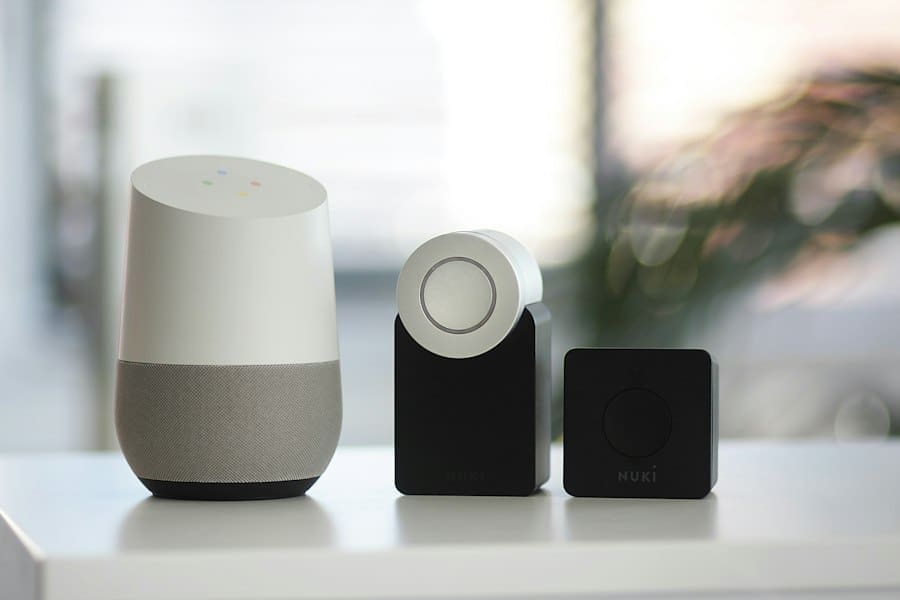
The first big decision I made was choosing a smart home ecosystem. For budget-conscious individuals like myself, Google Home (with Google Assistant) and Amazon Alexa are the dominant players. Both offer affordable smart speakers that double as voice assistants and can serve as the brain of your smart home.
Voice Control and Centralized Commands
I personally opted for Google Home, primarily because I'm already heavily invested in the Google ecosystem (Android phone, Gmail, etc.). I purchased a Google Nest Mini for under $30 during a sale, and it instantly transformed how I interacted with my smart devices. Now, instead of fumbling for my phone to open an app, I can simply say, "Hey Google, turn off all the lights," or "Hey Google, set the thermostat to 72 degrees." This hands-free control is incredibly convenient and makes the smart home feel truly intuitive. Amazon Echo Dot offers similar functionality at a comparable price point, so it often comes down to personal preference.
Creating Routines and Scenes
Beyond simple voice commands, both Google Home and Amazon Alexa allow for the creation of powerful routines and scenes. This is where the magic truly happens. I've set up a "Good Morning" routine that, with a single command, turns on my bedroom light to a soft glow, starts my coffee maker (via a smart plug), and tells me the weather forecast. My "Goodnight" routine turns off all the lights, locks my smart door lock (a future upgrade!), and sets the thermostat to a sleep-friendly temperature. These multi-action routines save me time and effort every single day and are completely free to set up once you have a smart speaker.
Understanding Device Compatibility
One crucial lesson I learned early on was the importance of device compatibility. Not all smart devices speak the same "language." While many modern budget devices are compatible with Google Home and Amazon Alexa, it's always wise to check for explicit compatibility before purchasing.
Wi-Fi vs. Zigbee/Z-Wave
Most budget-friendly smart devices connect directly to your home's Wi-Fi network. This is convenient because it doesn't require an extra hub. However, as I started adding more and more Wi-Fi devices, I noticed a slight slowdown in my network performance. For some devices, especially sensors or more advanced security components, I encountered devices that used Zigbee or Z-Wave protocols. These require a separate hub (often built into more advanced smart speakers or dedicated hubs from brands like SmartThings or Hubitat).
While these hubs add a small extra cost, they create a more robust and dedicated smart home network, reducing congestion on your main Wi-Fi. For a budget setup, I found focusing on Wi-Fi compatible devices first was the easiest entry point, and I'll consider a dedicated hub if my smart home grows significantly. My current Google Nest Mini acts as a basic hub for many of my Wi-Fi devices, but I'm aware of the limitations if I want to expand into more specialized protocols.
If you're looking to enhance your living space without breaking the bank, you might find the article on smart home solutions particularly helpful. It offers practical tips and insights on how to integrate technology into your home while staying within budget. For more information, check out this informative piece on smart home innovations that can elevate your lifestyle without overspending.
Continuous Improvement and Future Expansion
My smart home journey isn't a one-time setup; it's an ongoing process of discovery, refinement, and gradual expansion. The beauty of starting on a budget is that I can add new functionalities and devices as my needs evolve and as my budget allows.
Phased Approach to Upgrades
I've adopted a phased approach to upgrades. Instead of trying to do everything at once, I focused on those initial high-impact, low-cost areas. Now that those are established, I'm looking at the next set of priorities. For instance, a smart door lock is high on my list for enhanced security and convenience, even though it's a slightly larger investment. I plan to save up for it, knowing it will integrate seamlessly with my existing smart home ecosystem. This allows me to spread out the cost and avoid financial strain.
Exploring New Budget-Friendly Devices
The smart home market is constantly evolving, with new, affordable devices appearing all the time. I make it a habit to regularly check out tech blogs and sales events to see what new innovations are available. For example, I recently discovered budget-friendly smart blinds that I'm considering for my living room, allowing me to automatically adjust natural light and further enhance energy efficiency. Being aware of these emerging options means I can always find ways to make my home smarter without breaking the bank.
DIY Solutions and Open-Source Options
For the more adventurous, there's a whole world of DIY smart home solutions and open-source software like Home Assistant. While these often require more technical know-how, they can provide incredibly powerful and customized smart home experiences at a fraction of the cost of commercial systems. I've dabbled a little with some open-source sensors, and while they required more setup time, the cost savings and learning experience were invaluable. This path isn't for everyone, but it's a fantastic option for those who enjoy tinkering and want ultimate control over their smart home. For now, my focus remains on readily available and easy-to-implement commercial solutions that are budget-friendly.
Final Thoughts on Smart Home on a Budget
In conclusion, building a smart home on a budget is not only possible but genuinely rewarding. By focusing on my specific needs, prioritizing high-impact devices, and leveraging affordable technologies, I've transformed my living space into a more convenient, secure, and energy-efficient environment without draining my savings. My journey has shown me that intelligence in the home isn't about expensive gadgets; it's about thoughtful integration and smart choices.
Next step: Want to go further? Read the best budget smartphones.
Related reading: Smart Speakers: Useful Helper or Privacy Worry? · Best Tech Gifts Under €50
Enda Storrie is a writer and the creator of Story Bible, the planning journal and app for writers, and Chain Story Online, a free collaborative storytelling platform.